
QR gallery, FTP transfer, local delivery
One device from capture to delivery.
Shoot - Show - Sell
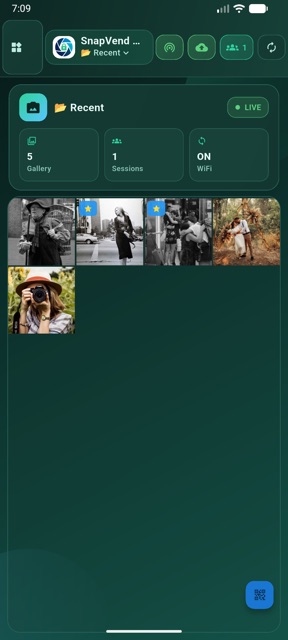
Bring photos in from local media or transfer them directly into the app from an FTP-capable professional camera, open WiFi or hotspot QR access, keep every shoot in its own session, let clients enter the QR gallery and deliver approved files as ZIP from the same device.
You can update the monthly and yearly prices plus the direct App Store link from site-config.js. Until the Apple app ID is added, the iOS logo opens the regional App Store search result.
Shoot - Show - Sell
Live Demo
Show the flow from WiFi / hotspot access to the session gallery.
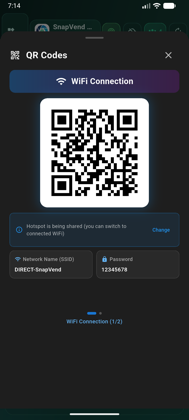
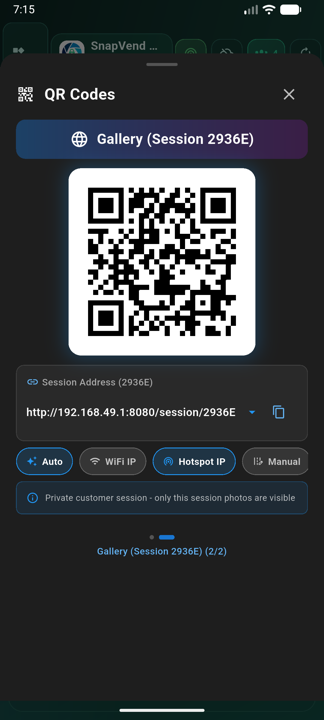
SnapVend first brings the client onto the same network through a WiFi or hotspot QR connection, then moves them into the right session gallery and through delivery in one product journey.
Sample product flow
SnapVend
SnapVend
Sample product flow
If you add a video URL, this area automatically turns into a live product demo.
Bring photos in
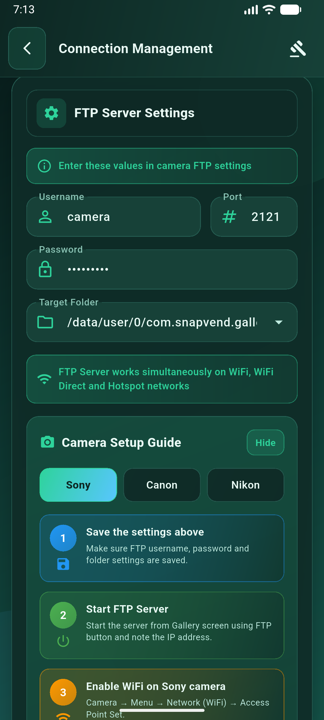
Select them from local media or transfer them directly into the app from an FTP-capable professional camera.
Open WiFi / hotspot QR access
Bring the client onto the same network in seconds without asking them to install the app.
Open the session gallery with QR
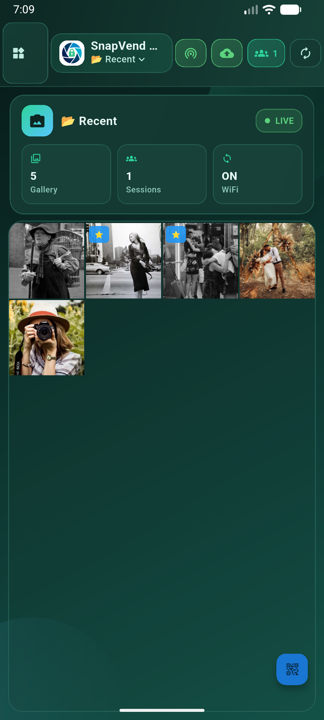
Let the client scan the session QR code and enter only the gallery created for that shoot.
Approve and deliver
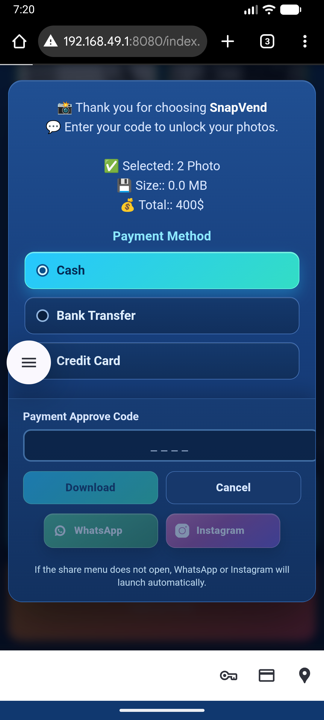
Confirm payment, handle PAC approval and finish delivery as ZIP from the same device.
Workflow
QR, sessions and delivery in one flow
SnapVend turns direct FTP intake from professional cameras, WiFi or hotspot QR access, session-based client flow and post-delivery reporting into one field-ready operation.
-
01
Import from a pro camera
Pick photos from local media or transfer frames directly into SnapVend from an FTP-capable professional camera.
-
02
Start WiFi / hotspot QR access
Bring clients onto the same network without asking them to install the app; the QR connection screen presents the network name, password and access details clearly.
-
03
Open the session gallery with QR
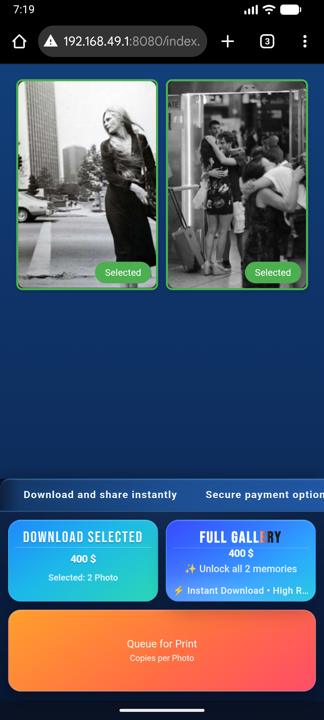
Each client or event can have its own session gallery, opened in seconds from the browser through a dedicated QR code.
-
04
Show local payment and confirm PAC
Display ready local payment methods for your business country, review the selection and complete PAC validation.
-
05
Deliver ZIP and review reports
Deliver approved files as ZIP, then track downloads, sales, conversion and revenue from the in-app reports view without losing the session structure.
Who Uses It
Built for professional on-site teams
A strong center for photographers who need quick preview, controlled selection and immediate delivery.
Wedding and event photographers
A strong fit for wedding teams that want to manage fast selection, immediate delivery and a live print list in the same workflow.
Studio and portrait sessions
Studios that want to review, select and deliver with the client in one place.
School, sports and corporate jobs
Crews that manage many sessions without mixing customers or deliveries.
Street, tourist-area and mobile portrait shoots
A strong fit for photographers who want to shoot on location, show selected frames instantly and sell single images or bundled packages.
Mobile delivery teams
Operations that work over local network or hotspot without internet dependency.
Use Cases
Show the field workflows where SnapVend fits best
Until verified customer logos and named testimonials are added, this section highlights the strongest operating scenarios and team profiles for the product.
Use Cases
Wedding and guest selection flow
Open a QR gallery during or right after the shoot, collect selections and complete delivery from the same device.
Wedding print list
Collect couple, family and guest selections while keeping print-ready frames in a separate print list, so on-site printing can move forward without breaking digital delivery.
Studio review desk
Stand next to the client in portrait sessions, narrow the set together and move to approval from one screen.
School and sports sessions
Keep classes, teams and session groups separate while managing many deliveries in one day.
Street and tourist-spot portrait sales
Shoot on location, show the selected frames instantly and manage single-image or package sales from the same device.
Corporate event booth
Run quick captures, QR access and ZIP delivery on location with a more branded handoff.
Reference Profiles
Wedding print and delivery teams
Built for wedding photographers who want to manage digital delivery and print preparation inside the same operation.
Fast delivery teams
Strong for crews that want to shoot, review and close delivery on the same day.
Brand-focused studios
A solid fit for studios that want custom branding, cleaner approval flow and controlled presentation.
Local-network operations
Designed for teams that prefer hotspot or local network workflows instead of depending on internet.
Multi-session field crews
Built for teams that manage separate clients or event groups without mixing deliveries.
Plans
Start free and grow with Pro
The free plan is ready for learning the flow. Pro removes delivery limits and unlocks business branding.
This repository does not include final monthly or yearly prices. Pricing and the direct App Store URL are controlled from site-config.js.
Ideal for learning the flow
0
to start
- Daily limit of 10 delivered photos
- SnapVend branding stays visible
- Custom business name and logo stay locked
- Good for testing before live use
Flexible monthly use
Update price
/ month
- Unlimited daily deliveries
- Custom business name and logo
- Custom ZIP file name
- Unlimited wedding print list
Pro Yearly
Most Popular
Better for regular use
Update price
/ year
- Lower effective annual cost target
- Unlimited daily deliveries
- Full branding control
- Built for heavier field usage
FAQ
The most common questions before teams start
These are the core questions photographers and event teams usually ask first.
Does SnapVend work without internet?
Yes. The main workflow can run over local network or hotspot. Cloud access is not required.
Can I transfer directly from a professional camera?
Yes. Photos can move directly into SnapVend from an FTP-capable professional camera over the same network or hotspot.
How do clients view the photos?
Clients first join through a WiFi or hotspot QR connection, then scan the session QR code to open only the gallery created for them in the browser.
What does the session structure do?
Each client, shoot or event can stay in its own session so files, selections, payment flow and delivery records never get mixed, while each outcome stays easier to track.
What can I track in the reports section?
The reports view helps you monitor sales count, revenue, download activity, conversion and average basket without breaking the live field workflow.
Can I use my own business name and logo?
Yes. Pro plans unlock custom business branding, logo usage and branded delivery.
Can I show country-specific payment methods to clients?
Yes. Once the business country is selected, completed local methods appear in the payment popup. Ready local method sets are available for Turkey, Spain, India, China and Japan.
What does the print list do?
The print list keeps selected frames ready for printing without breaking the delivery flow. It gives wedding teams a more controlled way to track which photos should be printed and how print preparation should move forward.
Which plan removes delivery limits?
Both monthly and yearly Pro plans remove the daily delivery limit.
Contact
Send your request, inquiry or partnership message directly to us
When you submit the form, your default mail app opens and prepares the message for snapvendinfo@gmail.com.
Write To Us
Use this form for demo requests, pricing questions, partnerships or custom workflow needs.
Ready?
Show, select and deliver faster on location with SnapVend.
QR access, FTP transfer, local sharing and reporting come together in one workflow.