


QR gallery, FTP transfer, local delivery
One device from capture to delivery.
Shoot - Show - Sell
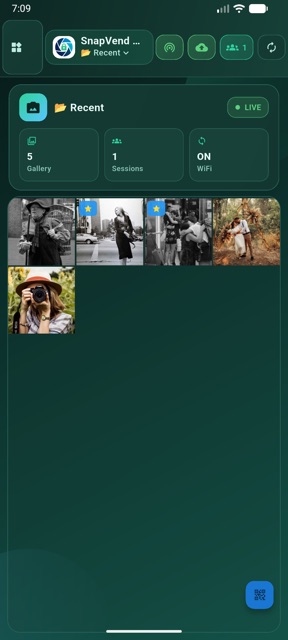
Bring photos in from local media or transfer them directly into the app from an FTP-capable professional camera, open WiFi or hotspot QR access, keep every shoot in its own session, let clients enter the QR gallery and deliver approved files as ZIP from the same device.

Shoot - Show - Sell
Quick Start
Set up the first delivery flow in minutes
A new SnapVend team can move from capture to delivery without learning a complex dashboard.
Install the app
Open SnapVend on a phone or tablet, then review business details and license status.
Bring photos in
Select from local media or transfer directly from an FTP-capable professional camera.
Show with QR
Open a separate session for each shoot, invite the client into the QR gallery and collect selections.
Approve and deliver
After payment/PAC control, deliver approved files as a ZIP from the same device.
Language Support
A clearer client flow with multilingual support
SnapVend gives international clients a clearer experience across the website, customer gallery and supported delivery flow screens.
12+
Supported Languages
Website and first touchpoint
Visitors can follow the website more comfortably and land on the right page faster when their language is supported.
Gallery and client selection
The browser gallery and selection flow become easier to understand for clients coming from different countries.
Approval and delivery flow
Payment, approval and delivery steps stay easier to explain when supported languages are available inside the flow.
Supported Languages
Turkish
English
Spanish
French
German
Italian
Portuguese
Russian
Arabic
Hindi
Japanese
Chinese
Live Demo
Show the flow from WiFi / hotspot access to the session gallery.
SnapVend first brings the client onto the same network through a WiFi or hotspot QR connection, then moves them into the right session gallery and through delivery in one product journey.
Live product demo
Field experience
This demo video was prepared from the Android version. SnapVend’s core gallery, QR access, selection and delivery flow is also presented with the same product experience on iPhone and iPad.
Bring photos in
Select them from local media or transfer them directly into the app from an FTP-capable professional camera.
Open WiFi / hotspot QR access
Bring the client onto the same network in seconds without asking them to install the app.
Open the session gallery with QR
Let the client scan the session QR code and enter only the gallery created for that shoot.
Approve and deliver
Confirm payment, handle PAC approval and finish delivery as ZIP from the same device.
Workflow
QR, sessions and delivery in one flow
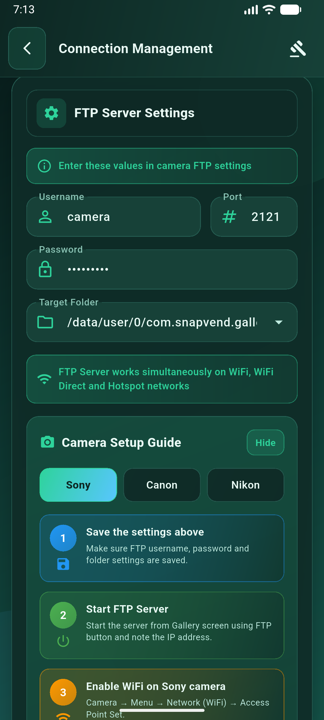
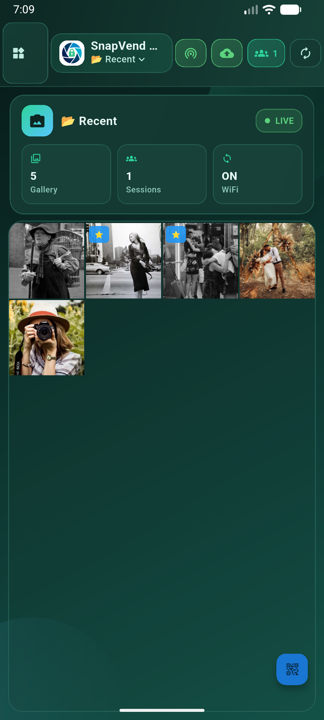
SnapVend turns direct FTP intake from professional cameras, WiFi or hotspot QR access, session-based client flow and post-delivery reporting into one field-ready operation.
-
01
Import from a pro camera
Pick photos from local media or transfer frames directly into SnapVend from an FTP-capable professional camera.
-
02
Start WiFi / hotspot QR access
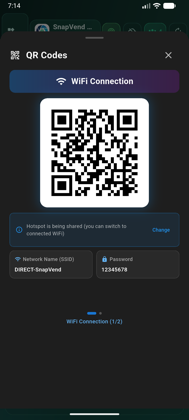
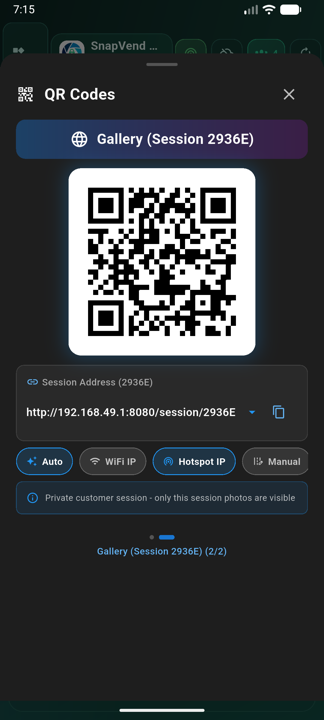
Bring clients onto the same network without asking them to install the app; the QR connection screen presents the network name, password and access details clearly.
-
03
Open the session gallery with QR
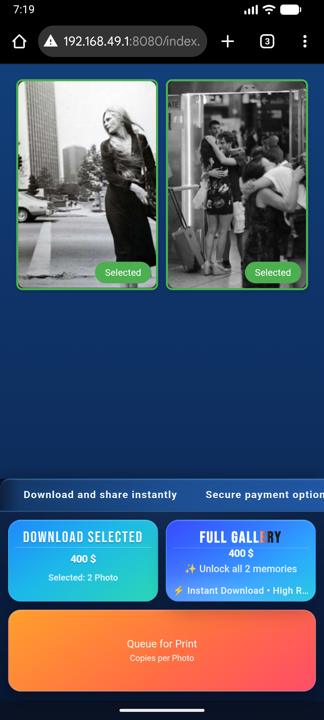
Each client or event can have its own session gallery, opened in seconds from the browser through a dedicated QR code.
-
04
Show local payment and confirm PAC
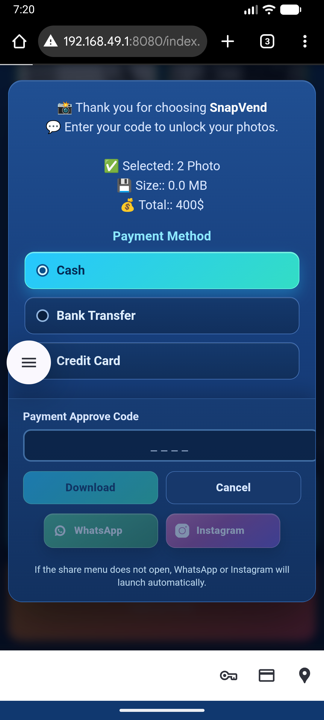
Display ready local payment methods for your business country, review the selection and complete PAC validation.
-
05
Deliver ZIP and review reports
Deliver approved files as ZIP, then track downloads, sales, conversion and revenue from the in-app reports view without losing the session structure.
Why SnapVend
A more controlled field workflow than a classic gallery handoff
SnapVend is built not only to show photos, but to combine selection, payment, print prep and delivery in one operational flow.
No extra app for the client
Clients enter the browser gallery through QR on the same network, so the flow starts faster without another app install.
Session-based structure
Each client, shoot or group stays separate, so selection, payment and delivery records do not get mixed.
Sales and delivery stay on one device
Local payment methods, PAC approval and ZIP delivery are completed on the same device.
Operational control for live shoots
FTP camera intake, print list, reports and branding controls keep busy field work more organized.
Clear license and device rules
Free and Premium status, active device rights, last validation time and offline access details are visible inside the app, so teams know which rights are active in the field.
Live Presentation
New shots appear on the big screen, sales start through QR
Photos transferred from a professional camera through FTP arrive in the SnapVend app. When live presentation is open, new shots are added automatically to the presentation on a TV, tablet, notebook or browser screen; clients scan the QR code to open their own photo and continue to payment or print request.
Event and venue screen
Photos rotate on the big screen. When a guest sees themselves, they scan the QR code and buy the photo from the payment screen.
Wedding print requests
Guests or the couple can send selected frames to the print list, while the team tracks print demand without confusion.
TV, tablet and notebook ready
Live presentation is designed around a browser-based viewing flow, so it can run on field screens, tablets or large TVs.
New Field Power
Sales, printing and licensing in one professional flow
SnapVend is no longer only a QR gallery handoff; it brings live presentation, staff approval, real print preparation and device-based Premium licensing into the same field operation.
Live sales presentation
Show photos on a notebook, tablet or TV browser like a premium viewing wall; clients enter their own gallery through QR.
Staff approval and PAC control
Client selections become sales requests. Your team can approve, reject or validate delivery securely with a PAC code.
Wedding print preparation
Move selected frames into the print order list; on iOS, prepare 10x15 cm PDFs and send them into the AirPrint flow.
Reports and export
Track gallery sales, live presentation sales and print revenue separately; export PDF and Excel summaries after the event.
Who Uses It
Built for professional on-site teams
A strong center for photographers who need quick preview, controlled selection and immediate delivery.
Wedding and event photographers
A strong fit for wedding teams that want to manage fast selection, immediate delivery and a live print list in the same workflow.
Studio and portrait sessions
Studios that want to review, select and deliver with the client in one place.
School, sports and corporate jobs
Crews that manage many sessions without mixing customers or deliveries.
Street, tourist-area and mobile portrait shoots
A strong fit for photographers who want to shoot on location, show selected frames instantly and sell single images or bundled packages.
Mobile delivery teams
Operations that work over local network or hotspot without internet dependency.
Use Cases
Show the field workflows where SnapVend fits best
Until verified customer logos and named testimonials are added, this section highlights the strongest operating scenarios and team profiles for the product.
Use Cases
Wedding and guest selection flow
Open a QR gallery during or right after the shoot, collect selections and complete delivery from the same device.
Wedding print list
Collect couple, family and guest selections while keeping print-ready frames in a separate print list, so on-site printing can move forward without breaking digital delivery.
Studio review desk
Stand next to the client in portrait sessions, narrow the set together and move to approval from one screen.
School and sports sessions
Keep classes, teams and session groups separate while managing many deliveries in one day.
Street and tourist-spot portrait sales
Shoot on location, show the selected frames instantly and manage single-image or package sales from the same device.
Corporate event booth
Run quick captures, QR access and ZIP delivery on location with a more branded handoff.
Reference Profiles
Wedding print and delivery teams
Built for wedding photographers who want to manage digital delivery and print preparation inside the same operation.
Fast delivery teams
Strong for crews that want to shoot, review and close delivery on the same day.
Brand-focused studios
A solid fit for studios that want custom branding, cleaner approval flow and controlled presentation.
Local-network operations
Designed for teams that prefer hotspot or local network workflows instead of depending on internet.
Multi-session field crews
Built for teams that manage separate clients or event groups without mixing deliveries.
Plans
Start free and grow with Premium
Free lets teams test the core workflow. Premium removes delivery, live presentation and print limits while unlocking branding and device privileges.
Start with the core workflow
US$0
starter plan
- 10 photo deliveries per day
- 10 print orders per day
- 10 live presentations per day
- SnapVend branding remains visible
- Test the core workflow before subscribing
Flexible Premium access
Update price
/ month
- Unlimited daily deliveries
- Unlimited live presentations and big-screen sales display
- Unlimited print queue / print order list
- Detailed sales, download and conversion reports
- Payment/PAC approval and ZIP delivery flow
- 1 phone + 1 tablet activation
- Custom business name, logo and ZIP filename
- Purchase restore and subscription management
Premium (Yearly)
Most Popular
Best value for regular field work
Update price
/ year
- All monthly Premium operational features
- Better total cost across 12 months
- 14-day offline access window for verified licenses
- Sustainable use for busy wedding, event and field teams
- Year-round unlimited live presentation, print queue and reports
- Full control over branding and delivery flow
Premium brings unlimited delivery, live presentation, print queue, detailed reports, payment/PAC approval, branded ZIP delivery and 1 phone + 1 tablet activation under one license. Yearly Premium keeps the same operational rights with better annual cost.
FAQ
The most common questions before teams start
These are the core questions photographers and event teams usually ask first.
What is SnapVend Gallery?
SnapVend Gallery is a mobile app for photographers that combines QR galleries, FTP camera transfer, client selection, local payment approval and ZIP delivery on one device.
Does SnapVend work without internet?
Yes. The main workflow can run over local network or hotspot. Cloud access is not required.
Can I transfer directly from a professional camera?
Yes. Photos can move directly into SnapVend from an FTP-capable professional camera over the same network or hotspot.
How do clients view the photos?
Clients first join through a WiFi or hotspot QR connection, then scan the session QR code to open only the gallery created for them in the browser.
What does the session structure do?
Each client, shoot or event can stay in its own session so files, selections, payment flow and delivery records never get mixed, while each outcome stays easier to track.
What can I track in the reports section?
The reports view helps you monitor sales count, revenue, download activity, conversion and average basket without breaking the live field workflow.
Can I use my own business name and logo?
Yes. Premium plans unlock custom business branding, logo usage and branded delivery.
Can I show country-specific payment methods to clients?
Yes. Once the business country is selected, completed local methods appear in the payment popup. Ready local method sets are available for Turkey, Spain, India, China and Japan.
What does the print list do?
The print list keeps selected frames ready for printing without breaking the delivery flow. It gives wedding teams a more controlled way to track which photos should be printed and how print preparation should move forward.
Which languages are supported?
The website, customer gallery and supported flow screens can be presented in these languages: Turkish, English, Spanish, French, German, Italian, Portuguese, Russian, Arabic, Hindi, Japanese, Chinese
Which operational features does Premium unlock?
Premium unlocks unlimited daily delivery, live presentation, print queue, detailed reports, payment/PAC approval, branded ZIP delivery, 1 phone + 1 tablet activation, purchase restore and subscription management.
Which plan removes delivery limits?
Both monthly and yearly Premium plans remove the daily delivery limit.
Do I need technical setup for first use?
No. After opening the app and importing photos, you can run QR session, client selection, payment/PAC control and ZIP delivery from the same device.
Is App Store download active for iPhone and iPad?
Yes. SnapVend Gallery is now available on the App Store. The website App Store buttons and download QR route iOS devices directly to the App Store listing.
Contact
Send your request, inquiry or partnership message directly to us
When you submit the form, your default mail app opens and prepares the message for snapvendinfo@gmail.com.
Write To Us
Use this form for demo requests, pricing questions, partnerships or custom workflow needs.
Ready?
Show, select and deliver faster on location with SnapVend.
QR access, FTP transfer, local sharing and reporting come together in one workflow.